
OnePlus Dialer
Communication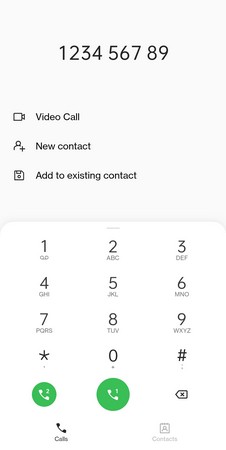
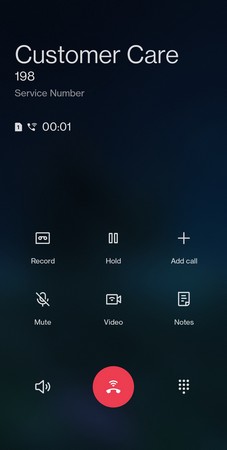
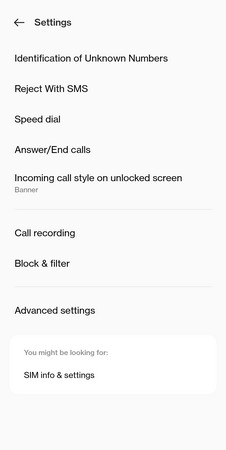
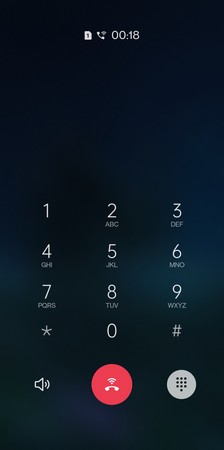

The OnePlus Dialer was the stock calling app on older OnePlus smartphones. After a policy shift, many devices now ship with Google’s Phone app instead, leaving fans of the original looking for a way to keep the familiar interface.
This page provides the latest OnePlus Dialer APK (v5.0.1), details its core functionality, and walks you through a safe installation on any compatible Android device.
Quick Information
| App/Game Name | OnePlus Dialer |
| Latest Version | 5.0.1 |
| Developer | Not listed |
| Category | Apps / Communication |
| App Size | 18.9MB |
| Package Name | Not listed |
| Last Updated | 14 June 2023 |
What Is OnePlus Dialer?
OnePlus Dialer is a native Android calling application designed for OnePlus devices. It offers a clean contact list, recent call log, speed‑dial shortcuts, and basic call‑management features such as call hold and merge. The app integrates with the system contacts database, so you can dial numbers directly from the interface without leaving the app.
Because it was originally bundled with OnePlus firmware, the UI follows the brand’s minimalist aesthetic and works well with OnePlus themes. It does not include the extra advertising or data‑sharing layers found in some third‑party dialers.
Compatibility
| Android Version | ✓ Verified — Android 9.0 and Above |
| Architecture (ARM64 / 32-bit) | ✓ Verified — Supports common device architectures |
| Internet Connection | ✓ Verified — May be required for ads, updates, or login |
| Storage Needed | Not Verified |
| OBB/Data Files | Not Verified |
| Root Required | Not Verified |
How to Install
- Download the OnePlus Dialer APK file to your device.
- Open Settings → Apps & notifications → Advanced → Install unknown apps (path may vary by device).
- Select the browser or file manager you used to download the APK and enable Allow from this source.
- Locate the downloaded
OnePlusDialer.apkin your file manager and tap it. - Follow the on‑screen prompts to install. Once finished, you can open the app from the app drawer.
Troubleshooting
- App not installed – Ensure you have enabled installation from unknown sources and that the APK matches your device’s CPU architecture (ARM/ARM64).
- Crashes on startup – The app may conflict with another default dialer. Try disabling or uninstalling the competing dialer, then restart the device.
- Calls not connecting – Verify that the app has permission to access the Phone and Contacts services in Settings → Apps → OnePlus Dialer → Permissions.
Safety & Security
OnePlus Dialer APKs are modified copies of the original firmware component. Always download from a reputable source and scan the file with an up‑to‑date antivirus before installing. Review the permissions the app requests; a dialer should only need access to Phone, Contacts, and Storage for call recordings (if supported). Keep in mind that future OS updates may overwrite or break the installed APK, requiring a reinstall.
Alternatives
- Google Phone (Dialer) – The default Android dialer with integrated voicemail, spam protection, and frequent‑contact suggestions.
- Truecaller – Offers caller ID, spam blocking, and a built‑in address book, useful for users who want extra security features.
- Simple Dialer – A lightweight, ad‑free dialer focused on speed and minimal UI, suitable for older devices.
Final Verdict
If you miss the original OnePlus calling experience, the OnePlus Dialer APK (v5.0.1) provides a familiar, ad‑light interface that works on most Android phones. It’s best for users who prefer a clean UI without the extra features of larger dialer apps. Verify compatibility, enable unknown sources, and keep an eye on future Android updates that might affect functionality.
Frequently Asked Questions
Only install the APK from a trusted source and scan it with an up‑to‑date antivirus before proceeding.
The app is designed for OnePlus devices but can run on most Android phones that meet the minimum OS requirements.
The specific minimum version isn’t listed, but the app was last updated in June 2023, so Android 8.0 (Oreo) or newer is typically sufficient.
No, root is not required; you only need to enable installation from unknown sources.
This can happen if the APK is incompatible with your device’s CPU architecture, if unknown sources are disabled, or if another dialer is set as the default.
Yes, you can have both apps, but you may need to set your preferred dialer in Settings → Apps → Default apps.
Older versions are not listed here; you would need to search reputable archives if you specifically need a previous release.
The app works with dual‑SIM devices, allowing you to choose which SIM to use when placing a call.
System updates can sometimes affect modified apps; you may need to reinstall or update the APK after a major OS upgrade.
Yes, call history is saved on the device, so you can view recent calls even without an internet connection.